

1. Topic Objective
Help end users make a safe first judgment when a battery system shows an alarm, cannot start, loses communication with the inverter, or behaves abnormally. The goal is not internal repair. The goal is safe checking, clear documentation, and correct escalation.
Key message: check safely, do not open the battery, and contact authorized support when the issue is repeated or unsafe.
2. 30-Second First Check
.thumb.png.d1b04ca44d61f426b86a940e54f35c3f.png "Enlarge image")
Use this first-check sequence before deciding what to do next: battery power status, LED indicators, inverter alarm, breaker and visible cables, recent events, then decision.
1. Check whether the battery can be turned on.
2. Observe RUN, ALARM and SOC indicators.
3. Read the inverter alarm screen.
4. Check breaker status and visible cable looseness.
5. Think about recent loadshedding, overload, restart, cable movement, expansion, or setting change.
6. If unsafe signs are present, stop and contact authorized support.
3. Safety Boundary

End users should only perform external, low-risk checks. Internal inspection, measurement, repair, and component replacement must be handled by authorized service personnel.
Users can check: switch, breaker, LEDs, visible cables, inverter screen alarm, and installation environment.
Users must not: open the enclosure, remove BMS or PCB, measure internal cell voltage, repair damage, force repeated restarts, or mix battery series without authorization.
4. Common Troubleshooting Scenarios

l Battery Cannot Start
Check power switch, breaker, and startup sequence. If one standard restart fails, contact support.
l Communication Failure
Check CAN or RS485 cable connection first. If the error continues, the installer should verify protocol and master battery settings.
l Temperature Alarm
Check indoor installation, ventilation, direct sunlight, and moisture. Do not inspect internal sensor wires.
l Short Circuit or Repeated Breaker Trip
Stop operation, avoid repeated restarts, take photos, and contact authorized support.
l Cell Imbalance or Swelling Risk
Observe external signs only. Do not open the battery or attempt internal inspection.
5. Standard Restart SOP

1. Turn off high-power loads first.
2. Shut down inverter and battery according to the installer-recommended sequence.
3. Wait for 1-3 minutes.
4. Check switch, breaker, power cables, and communication cable.
5. Restart according to the recommended sequence.
6. Observe LEDs and inverter display.
7. If the same alarm appears again, stop repeated restart attempts and contact support.
6. Communication Failure Check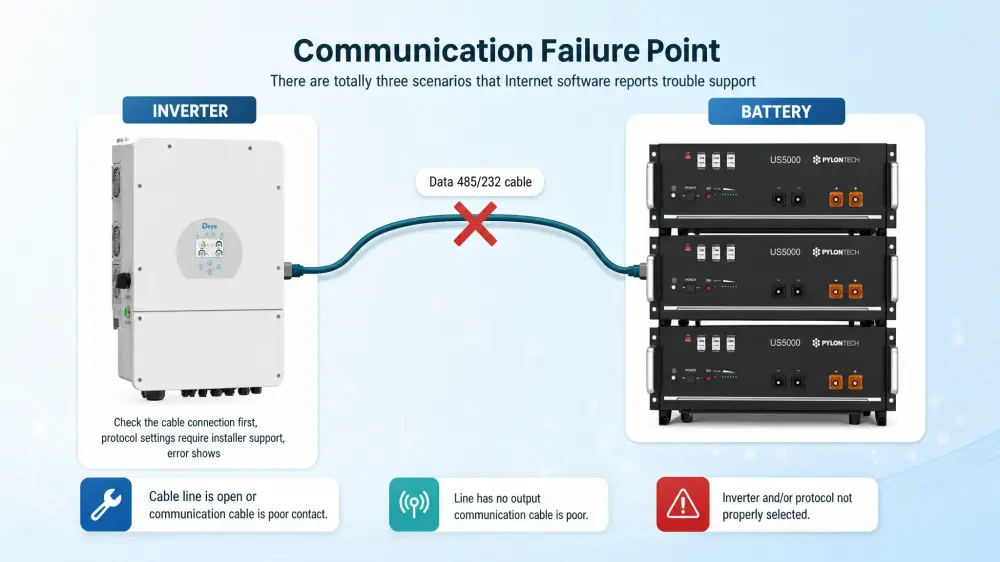
Communication failures may involve CAN cable, RS485 cable, inverter protocol, inverter settings, master battery selection, or internal battery faults. End users should only check visible cable connection and record the inverter error screen.
7. Stop Conditions

Stop using the system immediately if there is smoke, burning smell, swelling, water ingress, abnormal heat, visible damage, or repeated breaker tripping. These conditions require authorized diagnosis.
8. Before Contacting Support

Clear information helps the service team diagnose faster. Collect battery model and quantity, inverter brand and model, installation age, LED photos or video, inverter error screen, cable and breaker photos, recent event description, and any visible signs of damage.
Contact With US:
Solar Deity is an Authorised Pylontech Partner and Certified Service Partner in South Africa.
Join our Pylontech SA community today!🎉
WhatsApp: +27 66 342 4403
WhatsApp Technical Support: https://chat.whatsapp.com/Fh5L8WtsgNL9Fh6LsMXLkE
Facebook Community: https://www.facebook.com/share/g/16T6xwAGm9/
Book a Ticket: https://solardeity.co.za/pylontech-servicesupport/


Add comment